10 Cookbook & Recipe Book Templates for KDP
You've got the recipes. You have the passion. But staring at a blank page in your design software is where most cookbook projects stall out. Creating a polished, professional interior for a print-on-demand book involves more than just typing ingredients and steps. It requires thoughtful layout, consistent styling, and a design that actually helps people cook. That's where a solid set of templates changes everything. Instead of wrestling with margins, fonts, and spacing, you can start with a foundation built by a designer and focus your energy on what you do best: the content.
What's Inside the Template Pack
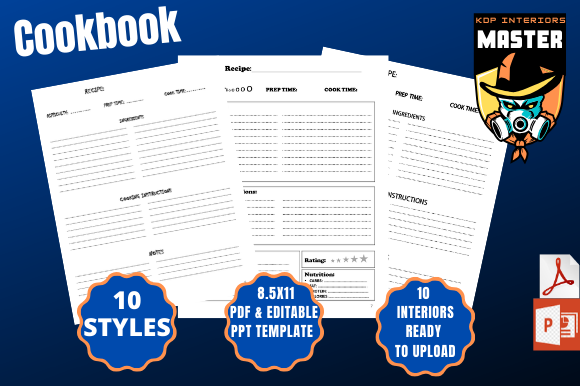
This collection gives you ten distinct recipe book layouts, each with its own personality. Think of them as starting points, not rigid cages. You get a 100-page PDF interior ready to upload directly to KDP, sized at the standard 8.5x11 inch trim with bleed included. But the real power for customization lies in the PowerPoint files. Yes, PowerPoint. It's a tool many people already own and understand, making it far more accessible than complex design software. Each template is fully editable, so you can change colors, swap fonts, move elements, and truly make it yours.
The variety covers a wide range of cookbook styles. Some templates embrace a clean, modern typography approach with plenty of white space, ideal for contemporary food blogs or minimalist cooking brands. Others lean into a more traditional, editorial design feel, with classic serif fonts and structured grids that evoke the warmth of a family recipe book. You'll find layouts that prioritize large, beautiful photo placeholders, perfect for showcasing your step-by-step images. There are also more text-focused designs for recipe collections where the story behind the dish is as important as the method itself. Each style offers a different visual personality, ensuring you can find a match for your specific project's tone.
Finding the Right Fit for Your Project
Choosing the right template is less about which one looks "prettiest" and more about which one serves your content and audience best. Consider the nature of your recipes. Are you compiling intricate, multi-step pastry instructions? A template with clear numbered steps, ample margin space for notes, and a clean sans serif font for maximum readability would be a strong choice. If you're creating a heritage cookbook filled with grandmother's handwritten notes, a template that incorporates a script or handwritten font for headers could add that personal touch without sacrificing the legibility of the core recipe text.
Think about your brand identity. The visual style of your book's interior is a direct extension of your brand, whether you're a food blogger, a small bakery, or a publisher specializing in niche cuisine. A consistent design language across your blog, social media graphics, and now your print book builds recognition and professionalism. The templates are designed with this in mind, offering cohesive styles that can be adapted to match your existing color palette and brand personality. This isn't just about making a book; it's about creating a cohesive piece of your larger brand ecosystem.
Practical Design Considerations
When you open the editable PPT files, you'll see the templates are built with real-world usability in mind. Font choices within each style are intentional. You might see a bold, modern display font for chapter titles paired with a highly legible serif or sans serif font for the body text and ingredients list. This creates a clear visual hierarchy, guiding the reader's eye from the recipe name down through the ingredients and into the method. Good hierarchy isn't just aesthetic; it's functional. It helps a busy home cook quickly find what they need.
Readability is paramount. The layouts ensure there is sufficient contrast between text and background, and the line spacing is set for comfortable reading, even in a kitchen setting. You'll notice that ingredient lists are often structured in a clean, aligned column for easy scanning, while method steps are presented in a logical, numbered sequence. These are small design decisions that have a big impact on the user experience of your finished book. Before finalizing your design, print a few test pages. Check how the fonts hold up in print, ensure your photos are high-resolution, and confirm the text is easy to read at arm's length.
The commercial licensing included with these assets is straightforward, giving you the freedom to sell the final books you create. This makes them a practical resource not just for personal projects, but for entrepreneurs and small business owners looking to add a new product to their line. You're not just buying a template; you're investing in a design asset that streamlines your production process and elevates the quality of your final product. By starting with a professionally designed foundation, you skip the steep learning curve of interior layout and move straight to publishing a cookbook that looks and feels legitimate.